Web (Kotlin/Wasm)
pdfkmp, pdfkmp-compose-resources, and pdfkmp-markdown ship a wasmJs
target — PdfKmp runs in the browser. The browser exposes no PDF engine to Wasm,
so the web target renders through PdfKmp's own pure-Kotlin PDF 1.7 writer
(kmpwriter, common code).
Install
Add the base coordinate to your wasmJs source set (or commonMain of a
multi-target project — Gradle resolves the pdfkmp-wasm-js variant
automatically):
kotlin {
    sourceSets {
        commonMain.dependencies {
            implementation("io.github.conamobiledev:pdfkmp:1.3.0")
        }
    }
}
Viewer not on web
pdfkmp-viewer is not published for web — browsers ship excellent PDF
viewers, so hand them the bytes instead (see below).
What works
Everything vector works exactly like the other platforms:
- Text layout (justification, wrapping, RTL alignment), tables, shapes
- Gradients, rotation / opacity, clipping
- QR codes, barcodes, charts,
freeDraw - Bookmarks / outline, named destinations (TOC), links, the info dictionary
- JPEG images and 8-bit RGB / grayscale PNG images (embedded without decoding)
The identical writer is validated on the JVM by re-parsing and rasterising its output with PDFBox, and the full common test suite also runs on actual Wasm under Node.
Fonts — embedding & coverage
The web backend embeds fonts. A PdfFont.Custom is parsed and embedded as a
TrueType subset (CIDFontType2 / Identity-H with a ToUnicode CMap, so the text both
renders and extracts). When a run contains code points WinAnsi can't represent and
no custom font is named, the backend automatically embeds a subset of the bundled
Inter instead — so Cyrillic works in the browser out of the box. Plain
Latin (WinAnsi) text still uses Standard-14 Helvetica for the smallest output. All
content streams are Flate-compressed by a pure-Kotlin DEFLATE implementation.
Font coverage caveats
Three honest limits remain (each warned through PdfLog):
- Only TrueType-outline TTFs embed. A CFF / OpenType-CFF (
.otf) custom font can't be embedded and falls back to Helvetica. - No synthetic bold / italic. A single-face custom font is embedded as-supplied; a bold or italic style over it reuses that one face unchanged. (The four bundled Inter faces are selected by weight / style.)
- Coverage is gated by the font's own glyphs. Inter covers Latin +
Cyrillic; scripts it lacks (CJK, Arabic, …) render as missing-glyph boxes
unless you supply a
PdfFont.Customwith the right coverage.
Current limits
Each is warned through PdfLog and skipped:
Web backend limitations
- Palette / alpha PNGs are not supported (only 8-bit RGB / grayscale PNG + JPEG).
- Interactive form widgets, encryption, and attachments are not supported.
Viewing & saving
Viewing on the web needs no library at all:
val doc = pdf { page { text("Hello, Wasm!") } }

doc.openInNewTab()                                  // browser's own PDF viewer (Blob URL)
doc.save(StorageLocation.Downloads, "hello.pdf")    // browser download
openInNewTab() hands the bytes to the browser's own PDF viewer via a Blob URL;
save(...) becomes a browser download. No embedded web viewer is planned.
Install coordinate
implementation("io.github.conamobiledev:pdfkmp:1.3.0") // resolves pdfkmp-wasm-js for the wasmJs target
Try the sample
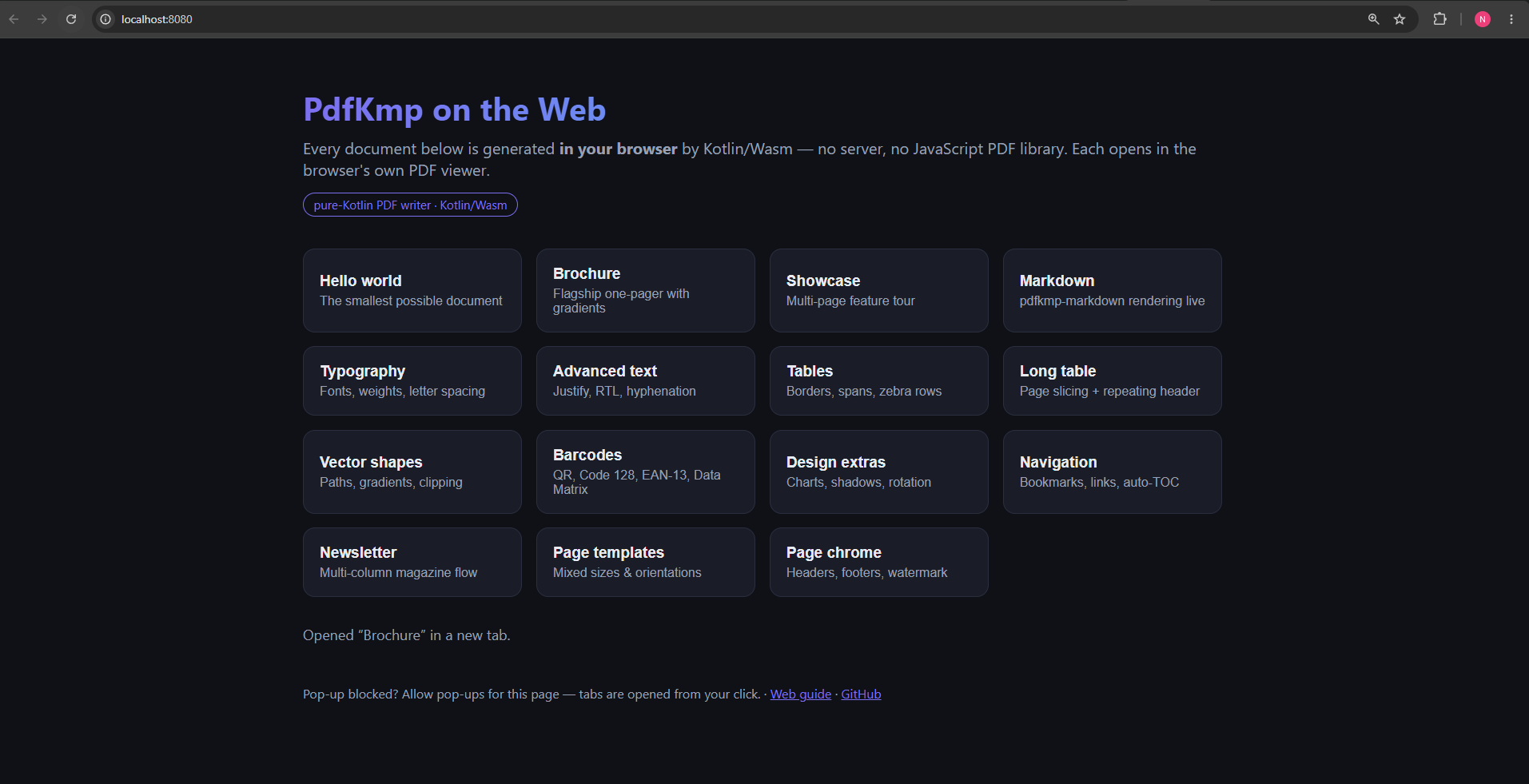
The repo ships a browser sample app — a button grid over the bundled
Samples.* documents plus a live pdfkmp-markdown demo, every PDF generated
in-browser on click:
./gradlew :sample-web:wasmJsBrowserDevelopmentRun
See also
- Platform parity — the Web column in the feature matrix.
- Fonts, i18n & RTL — the per-platform non-Latin coverage table.
- The Wasm feasibility and Streaming & memory internals notes.